
KensingtonWorks
Kensington had two unrelated utilities for its trackballs, one for Windows and one for macOS. In nine months we replaced them with KensingtonWorks: one product on both platforms, with a shared UI and core, new generic HID drivers and a signed, automated release pipeline.
- Client
- Kensington
- Year
- 2019
- Our role
- Turnkey: architecture, drivers, UI implementation, installers and release automation
- Platforms
- Windows, macOS
The challenge
Kensington's trackballs are popular with designers, architects and engineers. A trackball can move from one end of a very large drawing to the other far faster than a mouse. Kensington's trackballs and mice also have four buttons instead of the usual two, and the extra buttons can be remapped.
These users work in a rhythm: move to a new part of the drawing, then run a command. In CAD programs such as AutoCAD, commands are run from a menu or with a keyboard shortcut. With Kensington's software, a user can assign a shortcut to a trackball button. When the button is pressed, the software injects the keystrokes as if they had been typed.
Most users work in more than one program, and each program uses different shortcuts. So the software also has to know which application is in the foreground and send the shortcut assigned for that application.
In 2019 Kensington had two separate utilities. On Windows it was called KensingtonWorks and it supported per-application settings. On macOS it was called TrackballWorks. It had a completely different UI and did not support per-application settings.
What Kensington asked for
- One UI, the same on Windows and macOS.
- Per-application button mapping on both platforms.
- Settings saved to the cloud (Google Drive and Microsoft OneDrive), so they follow the user from one computer to another.
- Keystrokes injected by the device driver into the system's input queue, not by a user-mode application. Some CAD programs read HID input directly and ignore keystrokes that applications simulate. Input that enters at the lowest level looks like it came from a real keyboard, and every program accepts it.
- Generic HID drivers. The existing drivers worked only with specific devices, identified by device ID. The new drivers had to work with any Kensington device, including future products.
All of this had to be done in nine months, from January to August.
Our approach
Writing two applications and keeping them in sync would have doubled the work and caused the very problem we were hired to fix. So we built the product in three layers. The code that has to be different on each OS is kept as small as possible, and everything else is shared.
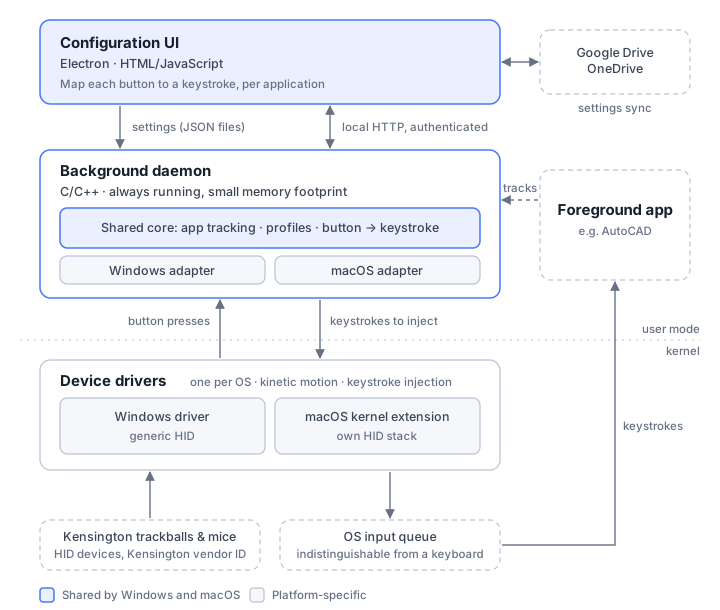
- Device drivers (one per OS). The drivers read button presses from any Kensington HID device and inject keystrokes into the system's input queue.
- A background daemon (C/C++, shared). The daemon is always running. It watches which application is in the foreground and listens for button presses from the driver. When a button is pressed, it looks up the keystrokes assigned to that button for the current application and sends them to the driver to inject. The OS-specific code sits in a small adapter for each OS, so most of the daemon is the same on both platforms.
- A configuration UI (Electron, shared). The UI is written in HTML and JavaScript, so it looks and works the same on Windows and macOS. An independent design firm designed it, and we built it from their mockups. The UI saves the settings as JSON files on the computer. The daemon reads these files to configure itself.
The UI and the daemon are separate programs to save memory. Electron runs a complete browser engine and uses a lot of memory. A configuration screen doesn't need to stay open: most people set up their buttons once and rarely change them. The part that has to run all the time is the daemon. It's written in C/C++ and uses very little memory, so almost all of the computer's memory is left for the programs people actually use.
The hard parts
A HID stack in a macOS kernel extension. macOS doesn't support HID driver extensions the way Windows does. So our macOS kernel extension had to include its own HID stack, limited to Kensington's vendor ID. We found a HID parser with a permissive license and adapted it for macOS. Now any new Kensington device that follows the HID standard works without a new driver.
Communication between the layers. We needed two protocols: one between the daemon and the driver, and one between the UI and the daemon. Both had to work the same way on both operating systems. The UI talks to the daemon through a protected HTTP server that runs inside the daemon. Any JavaScript UI can talk to an HTTP server, on either OS.
Cloud sync that copes with real life. Saving settings to Google Drive and OneDrive was simple. Keeping them in sync was harder. Whenever the settings change, the UI syncs them automatically. It also had to cope with dropped connections and out-of-date settings. This matters most for people who use one trackball on two computers.
Kinetic motion. The hardware doesn't provide kinetic motion, so the drivers have to simulate it. The old Windows driver had the feature, but it wasn't very stable. There was no source code for macOS at all, so we wrote it from scratch.
Build, packaging and testing
- Automated builds from day one. Once the architecture was settled, we wrote build scripts for Windows and macOS. Before that, Kensington had built the binaries in Visual Studio and packaged them by hand.
- Signed packages from the build script. The script also signs the packages. This is especially tedious on macOS, and now it's automatic on both platforms.
- Native installers. The old Windows installer was built with
InstallShield and didn't uninstall cleanly. We replaced it with an MSI
package built with WiX, which is the native format Microsoft recommends. On
macOS we used the current
.pkgformat, with shell scripts to set up the installation. - Driver tests. There wasn't time for a full test suite. So we wrote a test framework in Python that checks the driver's keystroke injection, and used it to catch problems in the driver after every change.
Results
KensingtonWorks shipped six weeks after the August target. With this much work in nine months, some delay was expected. The product was well received. For the first time, Windows and macOS users had the same software with the same features.
Kensington especially liked the release automation. One script builds, packages and signs the software for both platforms, and no previous vendor had automated their release process this far.
KensingtonWorks is still Kensington's supported software for its trackballs and mice, and it can be downloaded from Kensington's website. Kensington is now moving to a new app, Kensington Konnect, which is in beta.
Have a similar project?
Write to us and we'll get back to you.